Response path and escalation
Ask how urgent outages, everyday tickets, after-hours needs, remote work, and on-site Twin Cities support are routed. A useful provider comparison should make the support path clear before the first issue.

Use this guide when your Minnesota business is comparing MSPs, outsourced IT support, co-managed help, remote support, or a replacement provider. The strongest proposal should make responsibility, response, security, Microsoft 365 ownership, vendor coordination, transition risk, local escalation, industry fit, pricing scope, and free assessment fit easy to understand before you sign.
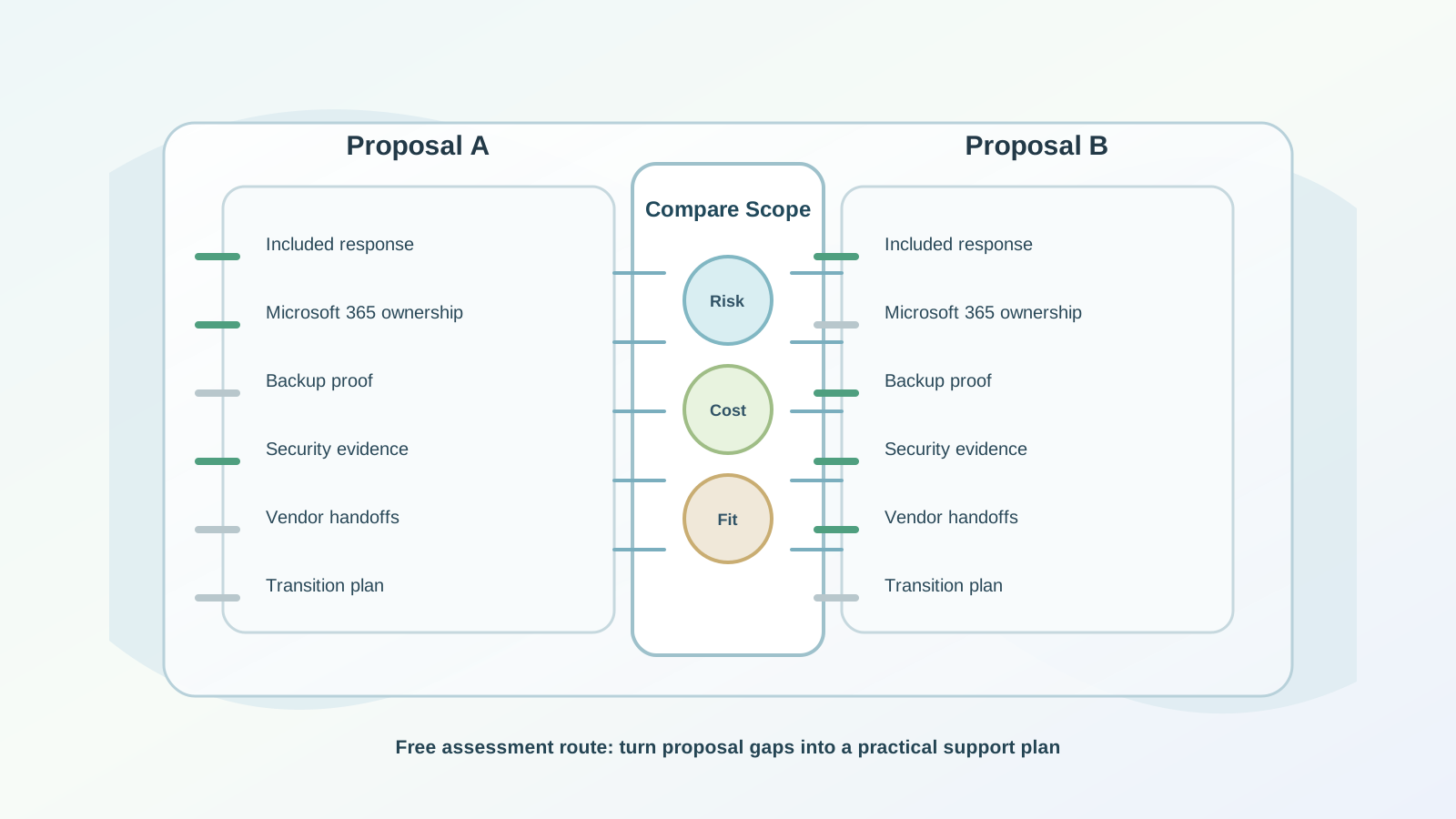
A provider comparison is not just a purchasing exercise. It is a way to decide who owns downtime, staff support, cybersecurity basics, backups, cloud administration, vendors, remote escalation, local follow-through, and leadership visibility. The best fit is usually the provider that makes those responsibilities specific.
Ask how urgent outages, everyday tickets, after-hours needs, remote work, and on-site Twin Cities support are routed. A useful provider comparison should make the support path clear before the first issue.
Look for monitoring, patching, documentation, ticket trends, reporting, vendor ownership, lifecycle planning, and regular leadership review instead of a vague promise to handle IT.
Confirm who manages licensing, Teams, SharePoint, OneDrive, mailbox changes, MFA, admin roles, guest access, onboarding, offboarding, and tenant security settings.
Compare how each provider handles MFA, endpoint protection, patching, backup testing, incident response, cyber insurance questions, and client security questionnaires.
Clarify who owns Wi-Fi, firewalls, switches, cabling, VoIP phones, internet providers, software vendors, warranty escalations, renewals, and recurring vendor handoffs.
A remote-first provider should still explain when hands-on Minneapolis, Bloomington, Edina, Andover, Anoka County, or Twin Cities work is needed for devices, cabling, phones, Wi-Fi, office changes, vendors, and network hardware.
The lowest number may hide important gaps. Compare what is included, what is separately scoped, how projects are handled, and what triggers emergency or on-site fees.
Ask how the provider will gather admin access, vendor contacts, documentation, backup status, Microsoft 365 settings, security gaps, and open issues before support begins.
A proposal review is most valuable when the business already feels a concrete pressure point. These moments help clarify whether the next step is managed IT, co-managed support, remote triage, a pricing review, a free assessment, or a focused project.
Use the comparison to identify whether recurring tickets, unclear ownership, slow response, vendor friction, or weak reporting are signs of a provider-fit problem.
Use a free assessment when the comparison has surfaced risk but leadership still needs help deciding whether the next step is managed IT, remote support, Microsoft 365 cleanup, security evidence, recovery planning, or a transition plan.
Translate monthly IT support into visible responsibilities: response paths, security work, Microsoft 365 administration, recovery evidence, projects, and leadership reporting.
Compare who will own MFA, endpoint protection, backup testing, access reviews, incident planning, and the documentation needed to answer evidence requests.
Confirm whether the provider can support office moves, new rooms, network changes, device refreshes, phones, vendors, and remote users without leaving gaps between projects and support.
These gaps do not always mean a provider is wrong for you, but they do deserve a clear answer before a Minnesota business commits to a support plan.
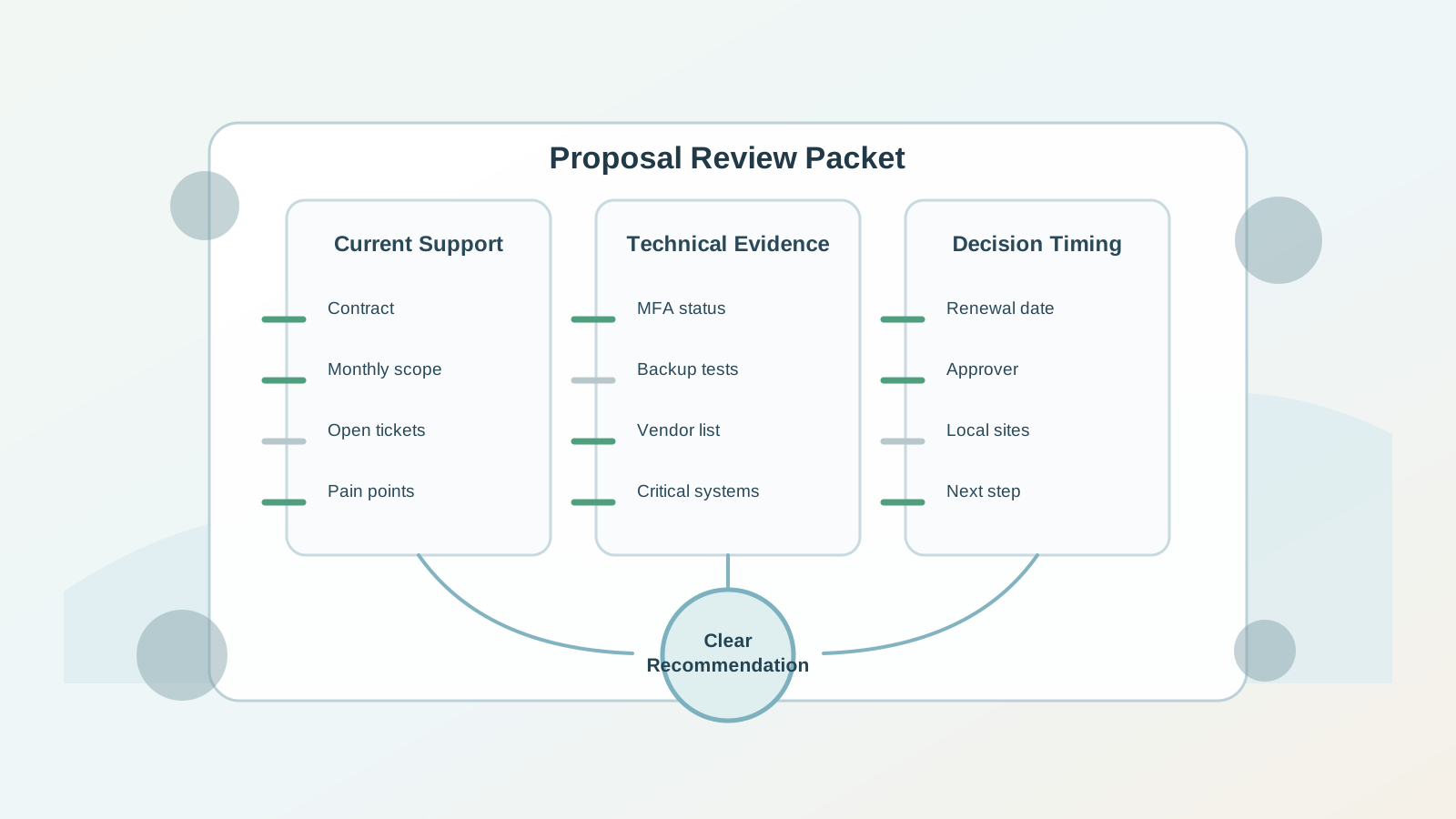
A second opinion gets sharper when the conversation starts with the right context. Gather what you can from the list below before asking PierceCC to compare proposals, review scope, help decide whether a free assessment should come first, or plan a provider transition.
Bring the current provider agreement, monthly cost, included services, after-hours rules, response expectations, open tickets, and the support complaints leadership hears most often.
Share each MSP proposal, quoted add-ons, project estimates, excluded work, security language, onboarding fees, cancellation timing, and any service-level promises that need plain-language review.
List the applications, Microsoft 365 tools, network equipment, phones, printers, cloud services, shared files, devices, and vendor platforms that affect revenue, client service, patient care, production, or field work.
Gather MFA status, endpoint protection notes, backup and restore evidence, cyber insurance questions, client security questionnaires, incident concerns, access-review gaps, and any deadlines tied to those items.
Clarify which Minneapolis, St. Paul, Bloomington, Edina, Andover, Anoka County, Hennepin County, or broader Twin Cities locations need hands-on support for devices, network gear, vendors, office changes, or support transitions.
Identify who can approve the next step, whether a renewal date or budget meeting is driving urgency, and what decision the provider comparison needs to support: stay, renegotiate, replace, or scope a cleanup project.
A provider can look strong on paper and still miss the workflows that make support hard in a specific business. Use these industry paths when the proposal needs to account for client data, patient or donor systems, seasonal deadlines, jobsites, leasing offices, financial questionnaires, field devices, or board visibility.
Compare provider fit when financial advisors, insurance agencies, or finance teams need Microsoft 365 security, client data safeguards, backup evidence, vendor coordination, and security-questionnaire readiness.
Compare financial services fitUse this path when tax-season readiness, secure client files, remote staff access, Microsoft 365 administration, and urgent peak-season escalation should shape the provider decision.
Compare CPA firm supportUse this path when patient-care uptime, device reliability, secure access, imaging or practice-management vendors, backups, and HIPAA-aware workflows need clearer ownership.
Compare healthcare supportUse this path when budget timing, donor or staff data, board visibility, volunteers, fundraising systems, Microsoft 365, vendors, and practical recovery planning affect provider fit.
Compare nonprofit supportUse this path when project-file access, jobsite connectivity, field devices, vendor handoffs, deadlines, and office-to-field workflows should be part of the MSP comparison.
Compare construction supportUse this path when leasing offices, resident communications, shared devices, property technology vendors, Wi-Fi, security basics, and portfolio transitions shape the provider decision.
Compare property management supportA strong MSP or outsourced IT proposal should explain both remote response and local follow-through. Use these service-area pages when provider fit depends on offices, devices, network equipment, vendor handoffs, move timing, security evidence, or support transitions in a specific part of the Twin Cities metro.
Compare provider fit for Minneapolis teams that need local follow-through around support transitions, office access, vendors, devices, networking, and leadership reporting.
Compare Minneapolis supportUse this route when provider scope needs to cover multiple Twin Cities offices, remote staff, local escalation, Microsoft 365 ownership, security evidence, and vendor coordination.
Review Twin Cities supportUse this route when east-metro teams are comparing managed IT, co-managed support, proposal scope, remote support, cybersecurity, recovery, or local escalation.
Compare St. Paul supportUse this route when Bloomington or south-metro provider comparisons depend on local follow-through for devices, network work, vendors, Microsoft 365, or support transitions.
Compare Bloomington supportUse this route when Edina or west-metro buyers want to compare MSP proposals, support scope, local escalation, security ownership, recovery expectations, and Microsoft 365 administration.
Compare Edina supportUse this route when north-metro buyers need to compare remote response, planned on-site escalation, vendor ownership, Microsoft 365, security, recovery, and support scope.
Compare Andover supportDifferent buyers need different levels of support. Use these pages to compare the current problem against the right PierceCC service path.
Use this path when the proposal comparison raises enough questions that you need help prioritizing provider fit, scope gaps, Microsoft 365 ownership, security evidence, backups, vendors, and local follow-through before choosing a support model.
Start a free assessmentUse this path when you want predictable support, monitoring, documentation, security basics, Microsoft 365 ownership, vendor coordination, and planning help.
Review managed ITUse this path when an internal IT owner needs help desk overflow, senior escalation, Microsoft 365 administration, security projects, or documentation support.
Compare co-managed supportUse this path when the comparison centers on remote help desk, Microsoft 365 troubleshooting, hybrid staff, recurring tickets, and local escalation when remote support is not enough.
Compare remote supportUse this guide when you need to compare proposal scope, pricing drivers, project boundaries, response expectations, and included responsibilities.
Review pricing factorsUse the checklist to gather downtime, Microsoft 365, cybersecurity, backup, network, and vendor details before comparing providers.
Use the checklistUse this path when provider comparison overlaps with a relocation, remodel, new rooms, internet handoff, cabling, Wi-Fi, VoIP, or device deployment.
Plan office IT changesUse this path when cyber insurance, client security questionnaires, MFA evidence, backups, endpoint protection, or incident planning are part of the provider decision.
Review security evidenceUse this path when the comparison needs proof that backups, restore testing, Microsoft 365 recovery, ransomware recovery, and continuity responsibilities are clear.
Compare recovery ownershipUse this path when provider fit depends on who owns Outlook, Teams, SharePoint, OneDrive, licensing, MFA, onboarding, offboarding, and tenant cleanup.
Compare Microsoft 365 supportUse this path when the current provider cannot stabilize an outage, account lockout, network issue, vendor delay, suspected incident, or business-disrupting support need.
Get urgent IT helpCompare the operating model behind the proposal: response paths, monitoring, Microsoft 365 administration, cybersecurity ownership, backup testing, vendor coordination, reporting, on-site support expectations, and what is excluded from monthly service.
Break-fix support reacts when something fails. A managed services provider should document the environment, monitor key systems, reduce recurring issues, keep security and backups moving, coordinate vendors, and give leadership visibility before problems become emergencies.
Price matters, but scope matters more. A lower monthly fee may exclude security work, Microsoft 365 administration, backup validation, on-site support, vendor coordination, or project planning. Compare responsibility, risk, and response before comparing only the number.
Consider a provider review when recurring tickets never become prevention work, response paths are unclear, Microsoft 365 ownership is inconsistent, backups are unproven, security evidence is hard to gather, vendors are not coordinated, or leadership cannot see what the IT spend is improving.
Remote support is often the fastest way to handle Microsoft 365, user access, workstation, printer, software, and vendor triage. A strong provider should also define when on-site Twin Cities support is needed for network gear, cabling, Wi-Fi, phones, device setup, or office changes.
The same provider-comparison questions apply, but local follow-through matters when support issues involve offices, devices, network gear, vendors, internet handoffs, phones, moves, or security evidence. Bloomington, Edina, Andover, Anoka County, Minneapolis, St. Paul, and broader Twin Cities teams should compare both the remote support model and the local escalation path.
Yes. A proposal should account for the workflows that make the business harder to support: client data, patient or donor systems, seasonal deadlines, jobsites, leasing offices, financial questionnaires, practice-management vendors, board reporting, or field-team access.
Use the free IT assessment when the comparison has uncovered enough uncertainty that leadership needs help prioritizing scope before choosing a provider. It is especially useful when the questions involve Microsoft 365 ownership, backup confidence, security evidence, recurring tickets, vendor handoffs, local follow-through, or whether managed IT, remote support, co-managed help, or project work should come first.
Bring the proposal, current monthly cost, recurring issues, open security questions, Microsoft 365 concerns, backup status, vendor list, internet and phone details, upcoming moves or projects, and examples of support requests that have frustrated the team.
A stronger review includes the competing proposals, current contract, renewal date, included and excluded services, recurring ticket examples, affected locations, critical applications, Microsoft 365 and admin-access questions, backup or security evidence, vendor contacts, local on-site needs, and the person who can approve the next step.
Yes. Pierce Computer Consulting can help Minnesota businesses identify what a proposal includes, what may be missing, where risk is unclear, and whether the support model fits the way the team actually works.
Share the proposal, current contract, renewal timeline, support pain points, critical systems, vendors, security questions, industry-specific workflows, and the locations where your team needs local follow-through. Pierce Computer Consulting can help clarify scope, risk, free assessment fit, and next steps before you choose an IT support provider.